3D Factory Pack: Bold Industrial Visuals for Modern Design
Why This 3D Asset Collection Stands Out
If you've ever tried to find high-quality industrial or manufacturing-themed visuals for a project, you know how frustrating the search can be. Most stock options feel generic, overly stylized, or just plain outdated. The 3D Factory Pack takes a different approach. It delivers a cohesive set of 3D factory illustrations that feel contemporary, versatile, and genuinely useful for real-world design work.
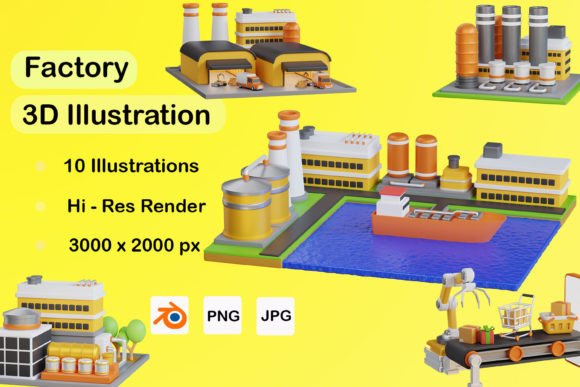
This collection includes 10 JPG files, 10 PNG files, and 10 BLENDER files. That combination alone puts it a step ahead of many competing asset packs. You get ready-to-use raster formats for quick projects and fully editable 3D source files when you need deeper customization. Whether you're building a website header, designing a poster, or crafting social media content, having both options available saves significant time and creative energy.
Visually, the 3D Factory Pack leans into a clean, modern industrial aesthetic. The factory illustrations feature bold geometric shapes, realistic textures, and thoughtful lighting that gives each scene depth without feeling cluttered. There's a nice balance between realism and stylization — the renders look polished enough for professional use but maintain enough character to avoid feeling sterile. Think of it as the sweet spot between photorealistic CGI and flat vector illustration.
Real-World Applications That Actually Work
Let's talk about where this kind of asset genuinely earns its place in your toolkit. Designers working on web design projects will find the PNG files especially handy for hero sections, about pages, or service descriptions related to manufacturing, logistics, supply chain, or industrial technology. Drop one of these factory illustrations behind a bold headline and you instantly establish context and credibility.
For logo design and brand identity work, the 3D elements can serve as powerful visual anchors. Imagine a startup in the automation or hardware space that needs to communicate innovation and precision. Rather than commissioning custom 3D work from scratch — which gets expensive fast — you can use the BLENDER files to adjust angles, colors, and compositions to match a client's brand palette and personality. That flexibility is a genuine advantage.
Packaging design is another strong fit. If you're working on product packaging for tools, components, or industrial goods, these illustrations add a layer of visual sophistication that flat graphics often can't achieve. The dimensional quality of 3D renders naturally draws the eye on crowded shelves or e-commerce listings.
Marketers and content creators will appreciate how well the social media graphics hold up at various sizes. The compositions are tight enough to read clearly as thumbnails on Instagram or LinkedIn, yet detailed enough to look sharp on larger screens. For editorial design, the factory visuals work beautifully as article headers, chapter openers, or feature illustrations in publications covering technology, engineering, or business operations.
Even UI and UX designers can find value here. Onboarding screens, dashboard backgrounds, or feature highlight sections for SaaS platforms in the industrial or manufacturing sector benefit from having contextually relevant, visually engaging imagery that doesn't feel like the same overused stock photos everyone else is using.
Getting the Most from the BLENDER Files
The inclusion of BLENDER files is where this pack really differentiates itself. If you're comfortable with Blender — even at a basic level — you can modify camera angles, adjust lighting setups, swap materials, or integrate the factory models into larger scenes. This opens up possibilities that static JPG and PNG files simply cannot offer.
For example, if a client needs a specific perspective that doesn't exist in the pre-rendered set, you can open the Blender file and create it yourself. Need a different color scheme to match brand guidelines? Adjust the materials directly in the 3D environment. Want to animate a factory scene for a video presentation or website background? The source files give you a starting point that's far more advanced than building from zero.
This makes the 3D Factory Pack a particularly smart investment for freelancers and small agencies who want to offer 3D-capable design services without the overhead of creating industrial models from scratch. It's a practical shortcut that doesn't sacrifice quality or originality.
Pairing These Visuals with Typography and Design Assets
Strong visuals deserve equally strong typographic treatment. When working with the 3D Factory Pack, consider pairing the illustrations with typefaces that complement the industrial feel without competing for attention. A clean sans serif font often works well for headlines — something with geometric or semi-condensed proportions that echoes the angular quality of the factory renders.
For body text, prioritize readability above all else. The 3D illustrations carry enough visual weight that your typography can afford to be understated. A well-chosen premium font with multiple weights gives you the flexibility to establish clear visual hierarchy without introducing visual noise.
If you're building out a full brand identity around industrial or manufacturing themes, think about how these 3D assets integrate with your broader design assets library. Consistency matters. The color palettes, lighting quality, and compositional style across all ten illustrations in the pack are already coordinated, which makes maintaining visual coherence across multiple deliverables much easier.
Practical Tips for Choosing and Using the Pack
Before committing to any asset collection, it's worth evaluating fit honestly. Ask yourself whether the visual style aligns with your project's tone. The 3D Factory Pack works best for projects that need to communicate professionalism, innovation, infrastructure, or industrial capability. It's less suited for playful, whimsical, or highly organic aesthetics.
Test the assets at the actual sizes you'll be using them. Pull the PNG files into your layout and check how they interact with your text, color scheme, and other visual elements. Sometimes a factory illustration that looks perfect in isolation can feel too busy when combined with dense content. The BLENDER files let you simplify or reframe scenes if needed.
Pay attention to commercial licensing terms as well. For client work, merchandise, or any project where the final output will be sold or widely distributed, confirm that the license covers your intended use. Most reputable asset packs include clear licensing information, but it's always worth verifying before a project goes live.
Finally, don't overlook the value of mixing these 3D assets with other creative font choices and visual elements. A factory illustration paired with a subtle script font or handwritten font can create an unexpected contrast that makes a design feel more human and approachable — useful for brands that want to appear innovative without feeling cold or corporate.
The 3D Factory Pack is a well-rounded collection that fills a genuine gap in available design assets. With its combination of ready-to-use files and fully editable 3D source material, it offers practical value for a wide range of creative professionals — from graphic designers and marketers to entrepreneurs and content creators building visual stories around industry, technology, and production.